
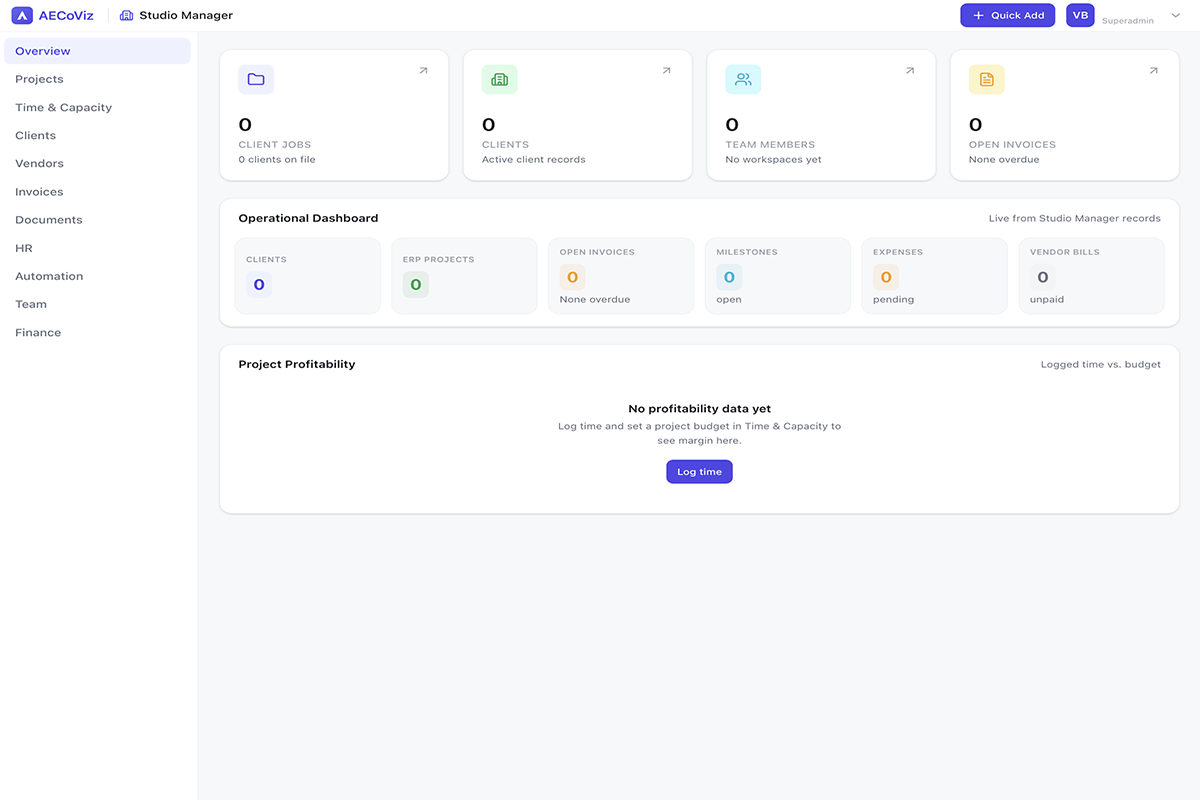
Studio Manager is the practice-management layer sitting alongside the design tools — clients, vendors, projects, invoices, time tracking, documents and finance, organized into 11 tabs (Overview, Projects, Time & Capacity, Clients, Vendors, Invoices, Documents, HR, Automation, Team, Finance) in one workspace rather than a separate ERP subscription. Its own "Projects" are the practice's real client jobs — deliberately separate from the design files you open in Floor Plan Studio, since a client engagement and a design file don't share a lifecycle. It's a standard platform tool included on every plan, including free workspaces, not an upsell, and a built-in demo workspace lets you explore a fully populated sample practice before entering real data.
What it helps you do
- Create clients, vendors, team members and practice projects
- Log time, track capacity and manage milestones/documents
- Raise invoices, track vendor bills and expenses
- Review P&L, cash flow and project profitability
11 operational tabs
Overview, Projects, Time & Capacity, Clients, Vendors, Invoices, Documents, HR, Automation, Team, Finance — each deep-linkable via URL.
Proposal pipeline
Track prospective work through Inquiry → Proposal → Negotiation → Signed/Lost, with a running open-pipeline total.
Project profitability
Hours logged vs. budgeted, with computed margin in $ and % per project, right on the Overview dashboard.
Quick Add
One modal covers all 9 record kinds — client, project, time, invoice, expense, vendor, bill, milestone, assignment.
Finance suite
P&L, cash-flow forecast, AR aging, pipeline value and financial goals, built automatically from your invoices, time and expenses.
Automation
A template library, event-triggered webhooks (e.g. invoice.paid) and a CSV report builder for custom datasets.

Everything included
Clients, vendors and the practice's own projects
Client records carry contact details, source and a lead/active/past status; vendor records carry type (consultant/contractor/supplier), discipline and a rating. A built-in proposal pipeline tracks prospective work by stage with fee estimates, separate from the practice's own project list — real client jobs run out of the office, deliberately kept apart from Floor Plan Studio's design-file list, since a project's business lifecycle (proposal → signed → invoiced) isn't the same thing as a design file's edit history.
Time, capacity and documents
Time entries track billable vs. non-billable hours per project; resource allocation assigns staff to projects with a date range and allocation percentage; and an 8-week capacity forecast compares committed vs. total hours assuming a standard work week, so overcommitment shows up before it becomes a deadline problem. Documents cover four distinct registers: milestones (with a Concept → DD → CD → Construction Admin phase cycle and client sign-off), a drawing register (revision codes, issued-for status), contracts with an in-app e-signature flow, and compliance documents with expiry tracking.
Finance: P&L, cash flow and AR aging
A profit & loss chart, cash-flow forecast and accounts-receivable aging build automatically from paid invoices, logged time and expenses — not a manual month-end reconstruction. Financial goals track a target (revenue or margin) against actual progress for a period, and a one-click "accountant handoff" exports a CSV tax summary (revenue, expenses by category, invoice list) for a given year.
HR and automation
Staff utilization, leave requests, license/registration expiry tracking and loaded labor cost per person feed directly into the profitability numbers elsewhere in the tool. On the automation side, a template library (proposals, contracts, checklists), event-triggered webhooks and a custom report builder (time/invoices/expenses, filtered by date range and project, exportable to CSV) let repetitive practice-management work run itself.

Who it's for
- Small architecture/design studios who don't want a separate ERP subscription
- Principals tracking receivables, vendor bills and project profitability in one place
- Teams that want time and milestone tracking next to the actual design work, not in a different tool
Export and output formats
- Invoices and documents stored per client/project
- CSV exports (invoices, reports, tax summary)
- Studio-level dashboards (open invoices, milestones, vendor bills, P&L)
Frequently asked questions
Is Studio Manager a separate subscription?+
No — it's a standard platform tool included on every plan, including free workspaces.
Does it replace dedicated accounting software?+
It covers the practice-management layer an architecture studio needs — clients, vendors, invoices, time, documents, a P&L and cash-flow view — not full double-entry bookkeeping or tax filing, though it does export a CSV tax summary for handoff to an accountant.
Can I track profitability per project?+
Yes — the Overview dashboard shows hours logged vs. budgeted and computed margin per project, and the Finance tab builds P&L and cash-flow views automatically from invoices, time and expenses.
Is a Studio Manager project the same project I design in Floor Plan Studio?+
No — Studio Manager's projects are the practice's real client jobs (proposal, fee, phase, budget), deliberately kept separate from the design files you open and edit in Floor Plan Studio, since the two have different lifecycles.
Can I track vendor bills and expenses, not just client invoices?+
Yes — vendor bills and expenses are tracked alongside client invoices, so project cost and profitability reflect what actually went out, not just what came in.
Want the complete picture?
Every tool, all 20 AI assistants, and how credits work — in one reference.